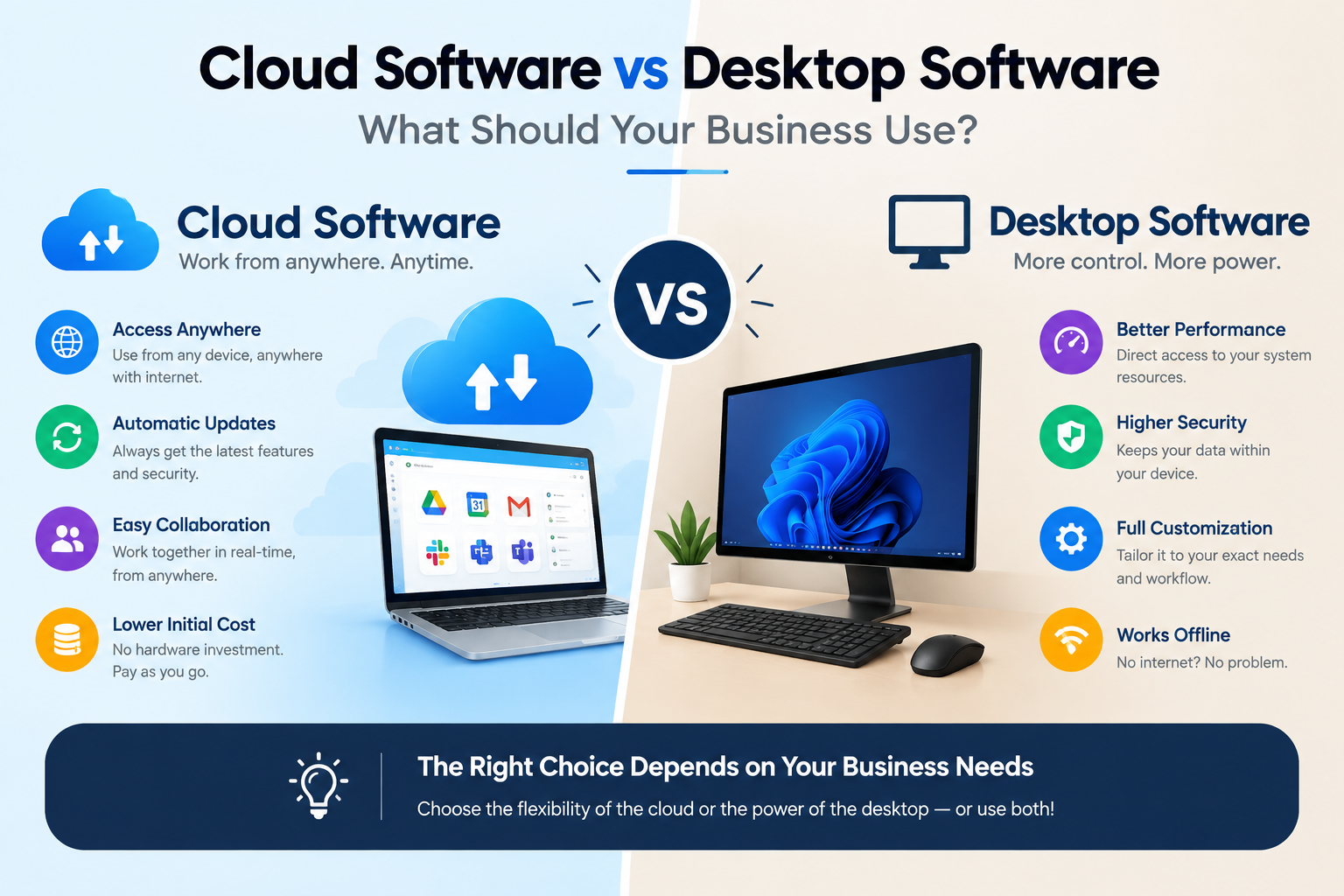
If you're a small business owner, startup founder, operations manager, or growing company, choosing the right software can have a major impact on how efficiently your team works.
One of the most common decisions businesses face is whether to use cloud software or desktop software.
Desktop applications have been used by businesses for decades. They are installed directly on computers and typically store or access data locally.
Cloud software works differently. Instead of being installed and operated entirely on one computer, the software and data are hosted on remote servers and accessed through the internet.
Both approaches have advantages and disadvantages.
The right choice depends on your business size, workflow, security requirements, budget, internet availability, team structure, and future growth plans.
Let's compare them in detail.
What Is Cloud Software?
Cloud software is an application that runs using infrastructure hosted on remote servers.
Users typically access the software through:
-
A web browser
-
Desktop applications connected to cloud services
-
Mobile applications
-
APIs
-
Other connected devices
Examples include cloud-based:
-
Accounting systems
-
CRM platforms
-
Project management tools
-
SaaS applications
-
File storage systems
-
Business dashboards
-
Collaboration platforms
-
Inventory systems
Instead of keeping everything on one computer, business data can be stored centrally and accessed by authorized users.
For example:
Employee A → Cloud Application ← Employee B
Both employees can access the same system, depending on their permissions.
What Is Desktop Software?Desktop software is installed directly on a computer or local network.
Examples include:
-
Accounting applications
-
Design software
-
Office applications
-
Inventory programs
-
Industry-specific software
-
Offline business applications
-
Local database applications
The application and, in some cases, the data are stored locally.
A typical setup may look like:
Computer → Software → Local Data
If multiple employees need access, the software may be installed on multiple computers or connected to a local server.
Cloud Software vs Desktop Software: Quick Comparison Feature Cloud Software Desktop Software Installation Usually minimal Required Access Internet-connected devices Usually specific computers Remote access Excellent Limited Updates Often automatic Often manual Collaboration Easier More difficult Data storage Remote/cloud servers Local computer/server Scalability Generally easier Can require additional setup Offline usage Depends on application Usually strong Maintenance Provider often manages infrastructure Business may manage it Initial hardware requirement Often lower Can be higher Multi-device access Usually easier Often limited Internet dependency Usually higher Usually lower Customization Depends on provider Can be highly customizableThe table provides a quick overview, but the real decision depends on how your business operates.
1. AccessibilityOne of the biggest advantages of cloud software is accessibility.
If your employees are authorized and have an internet connection, they can often access the software from different locations and devices.
For example:
Office → Laptop → Cloud Software
Home → Laptop → Same Cloud Software
Mobile → App → Same Business Data
This can be particularly useful for:
-
Remote teams
-
Sales teams
-
Traveling employees
-
Multi-location businesses
-
Managers who need access outside the office
Desktop software is generally more closely tied to the computer or network where it is installed.
2. Remote WorkRemote and hybrid work have changed how businesses use software.
With traditional desktop applications, employees may need:
-
Remote desktop access
-
VPN connections
-
Specific office computers
-
Local network access
Cloud software can simplify this because the application is designed to be accessed remotely.
For example, a sales employee visiting a customer can access the CRM from a laptop instead of waiting until they return to the office.
For businesses with distributed teams, this can be a major advantage.
3. Software UpdatesSoftware needs regular updates.
These updates may include:
-
Security patches
-
Bug fixes
-
New features
-
Performance improvements
-
Compatibility updates
With many cloud applications, updates are managed by the software provider.
Users can often access the latest version without manually installing major updates.
Desktop software may require users or IT teams to download and install updates.
For businesses managing dozens or hundreds of computers, this can become an administrative task.
4. CostCost is an important consideration.
Desktop software may use a:
One-time license + Maintenance + Upgrade model
Cloud software commonly uses:
Monthly or annual subscription model
Neither model is automatically cheaper.
You need to consider the total cost of ownership.
For desktop software, costs may include:
-
Software licenses
-
Computer hardware
-
Server hardware
-
IT support
-
Maintenance
-
Upgrades
-
Backup systems
-
Security
-
Installation
For cloud software, costs may include:
-
Subscription fees
-
User licenses
-
Storage
-
Premium features
-
Integration costs
-
Internet connectivity
A business should compare the total cost over several years rather than looking only at the initial price.
5. ScalabilityImagine your company has 10 employees today.
In two years, you may have 50.
Your software needs to grow with the business.
Cloud software is often easier to scale because businesses can add users, storage, features, or resources according to the service's available plans and architecture.
Desktop software may require:
-
Additional licenses
-
More powerful computers
-
Server upgrades
-
Network improvements
-
New installations
For rapidly growing companies, scalability should be considered from the beginning.
6. Data StorageWhere your business data is stored is another important difference.
Cloud Software
Data is generally stored on infrastructure managed by the cloud provider or hosting environment.
Desktop Software
Data may be stored on:
-
Local computers
-
Local servers
-
External drives
-
Internal company infrastructure
Cloud storage can simplify centralized access, but businesses should carefully evaluate the provider's security, backup, privacy, compliance, and data-recovery practices.
Local storage provides more direct control over infrastructure, but the business also takes on more responsibility for protecting and backing up the data.
7. SecuritySecurity isn't automatically better simply because software is cloud-based or desktop-based.
Both approaches can be secure when designed and managed properly.
Cloud software may provide features such as:
-
Centralized security management
-
Encryption
-
Access controls
-
Authentication
-
Automated backups
-
Security monitoring
-
Activity logging
Desktop environments can also be secured using:
-
Firewalls
-
Antivirus software
-
Access controls
-
Encryption
-
Network security
-
Regular backups
-
Security updates
The key question isn't simply:
"Cloud or desktop?"
Instead ask:
"How is the system designed, maintained, monitored, and protected?"
8. CollaborationCloud software generally has an advantage when multiple people need to work with the same information.
For example, a cloud-based project management platform can allow:
-
Managers to assign tasks
-
Employees to update progress
-
Customers to view information
-
Teams to share documents
-
Management to monitor dashboards
Everyone can work with a centralized system.
Desktop software can support collaboration too, particularly through local networks, but the setup may be more complicated.
9. Internet DependencyThis is one area where desktop software can have an advantage.
Cloud software generally requires an internet connection, although some applications offer offline functionality.
If your business operates in an area with unreliable internet, this needs to be considered carefully.
Desktop software can often continue working locally even when the internet is unavailable.
However, if the application depends on cloud services for synchronization, online databases, payments, or other features, internet access may still be required.
10. PerformancePerformance depends on the type of software.
Desktop applications can take advantage of the local computer's processing power.
This can be particularly useful for:
-
Video editing
-
3D rendering
-
Engineering software
-
Graphic design
-
Scientific applications
-
High-performance data processing
Cloud applications can also provide powerful processing through remote infrastructure.
For many standard business applications, the difference may be less important than factors such as internet speed, server performance, application architecture, and optimization.
11. Hardware RequirementsDesktop software can sometimes require powerful computers.
For example, specialized software may require:
-
High-performance CPU
-
Large amount of RAM
-
Dedicated GPU
-
Large storage capacity
Cloud software can move some processing and infrastructure requirements to remote servers.
This can reduce the need for expensive local hardware for certain types of applications.
However, cloud applications still require suitable devices and reliable connectivity.
12. Backup and Disaster RecoveryWhat happens if your computer fails?
With locally stored desktop software, data recovery can become difficult if backups aren't maintained.
Potential risks include:
-
Hard-drive failure
-
Accidental deletion
-
Malware
-
Hardware damage
-
Theft
-
Fire
-
Data corruption
Cloud systems can make centralized backup and disaster recovery easier, depending on the provider and configuration.
But businesses should never assume that "cloud" automatically means "backup."
Always understand:
-
Where data is stored
-
How often backups happen
-
How long backups are retained
-
How data can be restored
-
Whether backups are geographically separated
Desktop software can sometimes offer extensive customization, particularly for specialized industries.
Businesses may have unique requirements that standard cloud software doesn't support.
For example:
-
Manufacturing workflows
-
Specialized inventory systems
-
Custom accounting processes
-
Industrial applications
-
Internal enterprise systems
Cloud software can also be highly customizable, particularly when the business uses a custom-built cloud application.
This is where custom software development can provide an important middle ground.
A business can have a cloud-based application specifically designed around its workflows.
14. IntegrationsModern businesses rarely use only one software system.
You may need to connect:
Website + CRM + Accounting + Payment Gateway + Email + Inventory + Analytics
Cloud applications often provide APIs that make these integrations possible.
Desktop software can also integrate with other systems, but integration may require additional development or access to local databases and systems.
If your business depends on multiple applications, integration capability should be one of the key factors in your decision.
When Should Your Business Choose Cloud Software?Cloud software may be a strong choice if your business:
-
Has remote employees
-
Has multiple locations
-
Needs access from different devices
-
Requires team collaboration
-
Wants easier software updates
-
Is growing quickly
-
Needs centralized data
-
Uses multiple online services
-
Wants to reduce infrastructure management
-
Needs flexible access
Examples include:
-
Startups
-
SaaS companies
-
Digital agencies
-
Sales organizations
-
Service businesses
-
Distributed teams
-
E-commerce businesses
Desktop software may be appropriate when:
-
Internet connectivity is unreliable
-
Offline access is essential
-
The application requires high local processing power
-
Your workflow depends on specialized desktop software
-
Data needs to remain within local infrastructure
-
Existing systems already work effectively
-
You need specific hardware integration
Examples may include specialized engineering, design, manufacturing, scientific, or industrial applications.
What About Hybrid Software?You don't always have to choose one or the other.
A hybrid approach combines cloud and desktop technologies.
For example:
Desktop Application → Local Processing
Cloud Server → Centralized Data
Web Dashboard → Remote Management
This can be useful when a business needs both local performance and cloud accessibility.
For example, a manufacturing company could use desktop software to communicate with local machinery while sending selected operational information to a cloud dashboard for management.
Cloud Software vs Desktop Software: Which Is Better?There is no universal winner.
The right choice depends on your business.
Choose Cloud Software If You Prioritize:
-
Remote access
-
Collaboration
-
Scalability
-
Centralized data
-
Easier updates
-
Multi-device access
-
Cloud integrations
Choose Desktop Software If You Prioritize:
-
Offline functionality
-
Local processing
-
Specialized applications
-
Local infrastructure
-
Hardware integration
-
Direct infrastructure control
Consider Hybrid Software If You Need:
-
Local processing
-
Cloud connectivity
-
Centralized reporting
-
Remote management
-
Integration between local and online systems
Before investing in software, ask:
1. Where does my team work?
If employees work from different locations, cloud software may be more convenient.
2. How important is offline access?
If your business cannot operate without software during an internet outage, desktop or hybrid solutions may be worth considering.
3. How fast will the business grow?
Rapidly growing businesses should consider scalability from day one.
4. What type of data do we manage?
Consider security, privacy, backup, and compliance requirements.
5. What systems need to be connected?
Check API and integration capabilities.
6. How much technical support do we have?
Cloud solutions can reduce some infrastructure responsibilities, while desktop environments may require more local IT management.
7. Do we need custom functionality?
If your business has unique processes, custom software may be more suitable than forcing your workflow into a standard application.
The Future of Business SoftwareThe line between cloud and desktop software is becoming less obvious.
Modern applications can combine:
-
Cloud infrastructure
-
Desktop applications
-
Mobile apps
-
Web dashboards
-
APIs
-
AI
-
Automation
-
Local processing
Instead of asking only:
"Should we use cloud or desktop?"
businesses should ask:
"What technology architecture best supports our business?"
This shift is particularly important for companies developing custom software.
The objective isn't simply to choose the latest technology.
It's to create a system that is secure, reliable, scalable, easy to use, and aligned with the business.
How Tamada IT Services Can HelpChoosing the right software architecture can be difficult when your business has unique workflows and requirements.
At Tamada IT Services, we help businesses design and develop technology solutions based on their actual operational needs.
Our services include:
-
Custom software development
-
Cloud application development
-
Web application development
-
SaaS development
-
Desktop application development
-
Mobile app development
-
API development and integration
-
Business automation
-
Database development
-
Admin dashboards
-
Software maintenance and support
Whether you need a cloud-based platform, desktop application, or hybrid solution, the right architecture starts with understanding your business processes.
Don't choose technology simply because it's popular. Choose technology because it solves your business problem.
Final ThoughtsThe cloud software vs desktop software decision isn't about which technology is universally better.
Cloud software can provide excellent accessibility, collaboration, scalability, and centralized management.
Desktop software can provide strong offline functionality, local performance, and specialized capabilities.
For some businesses, the best answer may even be a combination of both.
Before making a decision, consider your employees, customers, workflows, budget, security requirements, internet connectivity, integrations, and future growth.
The right software should make your business more productive—not more complicated.
Frequently Asked Questions
Is cloud software better than desktop software?
Not always. Cloud software is often better for remote access, collaboration, scalability, and centralized management, while desktop software can be better for offline use, specialized applications, and local processing.
Is cloud software more secure?
Cloud software isn't automatically more secure. Security depends on the application's architecture, provider, access controls, encryption, monitoring, backups, and maintenance.
Can desktop software work without the internet?
Many desktop applications can operate offline, depending on how they are designed. However, applications that depend on online services, cloud synchronization, licensing, or APIs may still require internet connectivity.
Is cloud software more expensive?
Not necessarily. Cloud software often uses subscriptions, while desktop software may use one-time licenses. Businesses should compare the total cost of ownership, including hardware, maintenance, upgrades, infrastructure, and support.
Can I convert desktop software into cloud software?
In many cases, existing desktop applications can be redesigned, modernized, or rebuilt for cloud environments. The approach depends on the application's architecture, programming technology, database, integrations, and business requirements.
What is SaaS software?
SaaS, or Software as a Service, is a software delivery model where users access an application as a service, commonly through the internet and often through a subscription.
Should a small business use cloud software?
Cloud software can be a good option for small businesses that need flexible access, collaboration, centralized information, and easy scalability. However, the specific business requirements should be evaluated before choosing a solution.
Can Tamada IT Services build custom cloud or desktop software?
Yes. A custom software solution can be designed around your business requirements, whether you need a cloud application, desktop application, web platform, mobile app, or hybrid system.